

Maintenance & Analysis
Make your PowerBuilder code understandable, maintainable, and secure.
Solutions for common maintenance challenges that PowerBuilder teams face.
The Reality of PowerBuilder Maintenance
Most PowerBuilder applications have been running for many years. The developers who built them may have retired or moved on. Sometimes, documentation is outdated or missing entirely. The source code is large and complex, and it's difficult to constantly verify its security and quality.
This creates real challenges:
- How do you modify code you don't fully understand?
- How do you ensure changes won't break something elsewhere?
- How do you transfer knowledge before your last expert retires?
The solutions on this page address these maintenance realities with tools that help you understand, document, and safely modify PowerBuilder applications.
Quick Navigation
Understand existing code
Understand your application's structure and dependencies
Maintenance challenges
- Want to visualize the overall application structure.
- Want to visualize data operations (tables/columns) performed by each object.
- Want to know reference relationships between screens/objects/code.
- Specifications are old or missing, so want to generate documentation from source.
Solutions
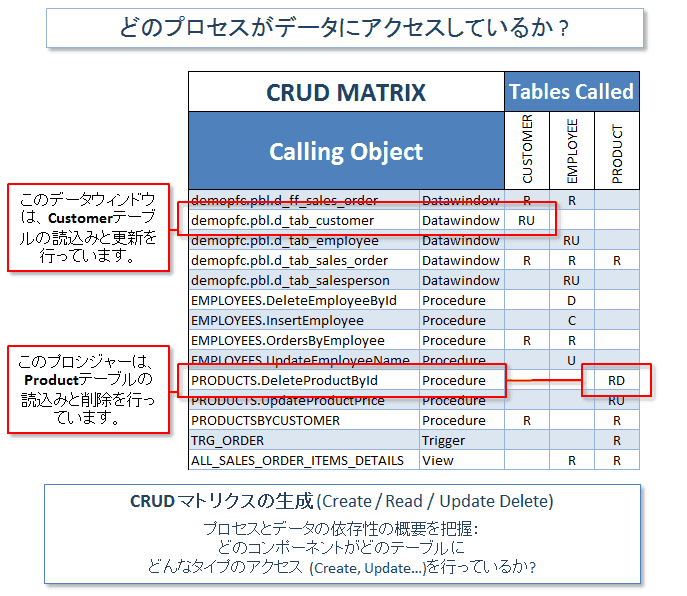
Review CRUD Operations in your Code
Generate a CRUD matrix showing which programs access your data.
For instance, which DW or Procedures Create/Read/Update/Delete which Tables..
- Review dependencies between database and PB applications.
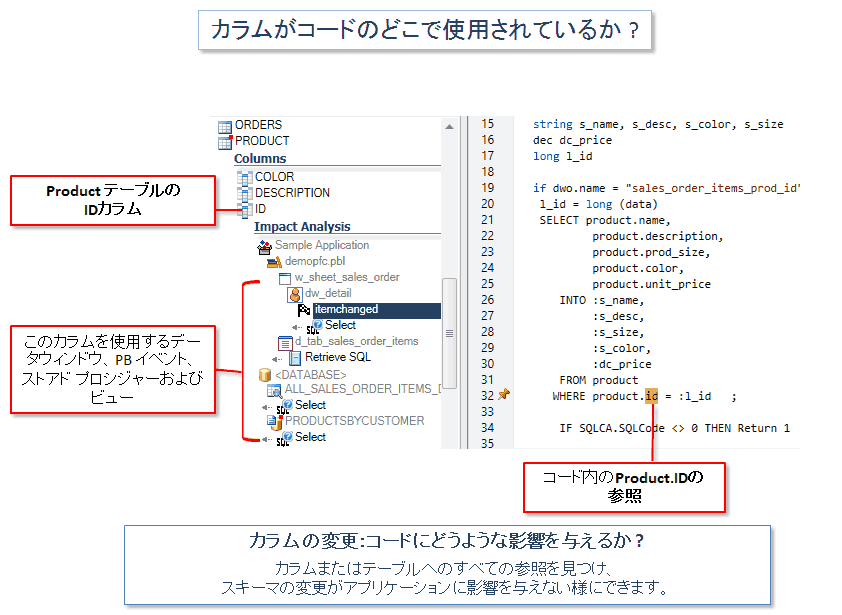
- Analyze the impact on the code if you change a table or a column.
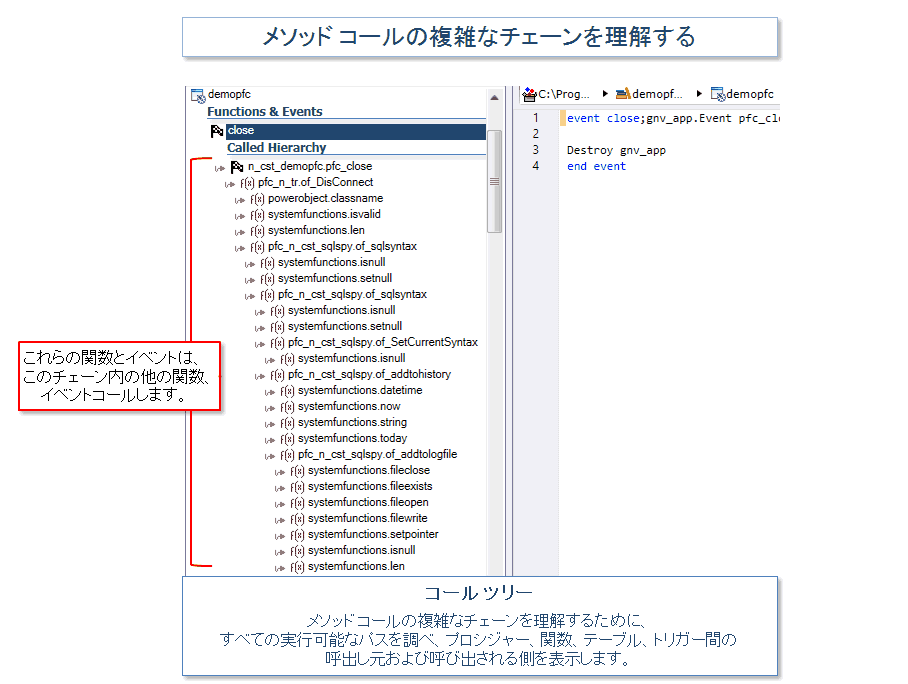
Explore Complex Chains of Calls
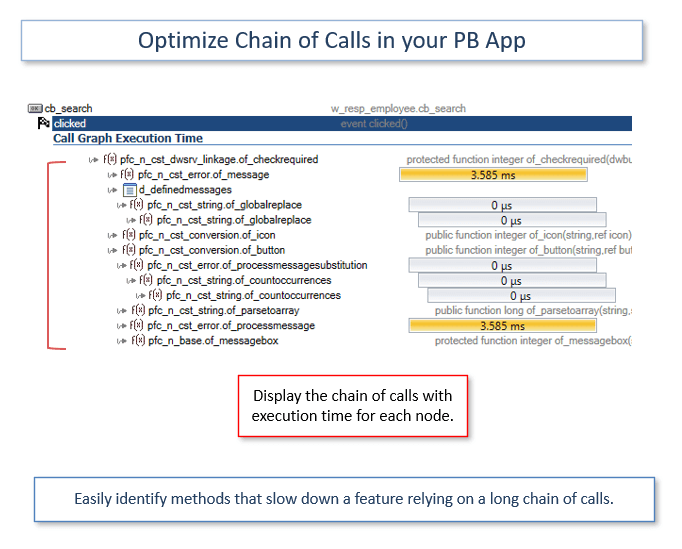
Display Call Trees: functions and events calling each others.
Understand an application feature composed of multiple functions
Visualize all possible execution paths.
Drill down in the code for more details.
Ask AI to explain the code

Generate automatically the documentation to save time.
keep documentation updated when source code changes.
Understand the objects composing the application, their attributes and dependencies
Source code documentation
AI can explain the code on a business level.
Understand the purpose of a windows, or a function in the application.
AI can also generate comments for an existing function. This helps developers understand each block of code.
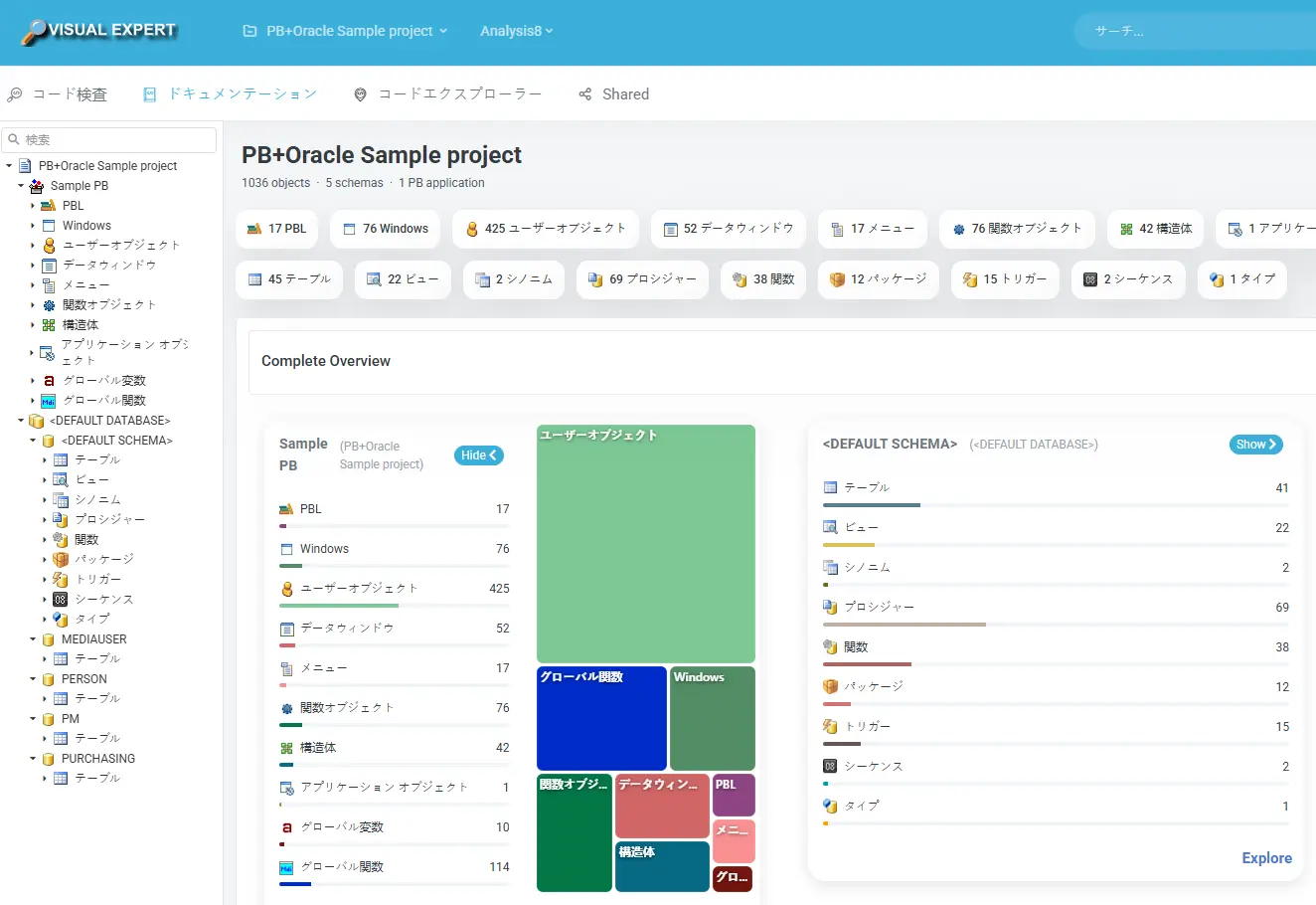
Introduction to Visual Expert
Presentation of the main features
Visit Japanese Site
Visual Expert Product Leaflet
Quick overview of Visual Expert features, benefits, and use cases
Download PDF
Try Visual Expert Demo
Web version analyzing a PowerBuilder demo application
Launch Demo
Code inspection
Examine your PowerBuilder code to find bugs, security and maintainability problems.
Maintenance challenges
- Want to eliminate security vulnerabilities / bugs / maintainability issues through code inspection.
Solutions
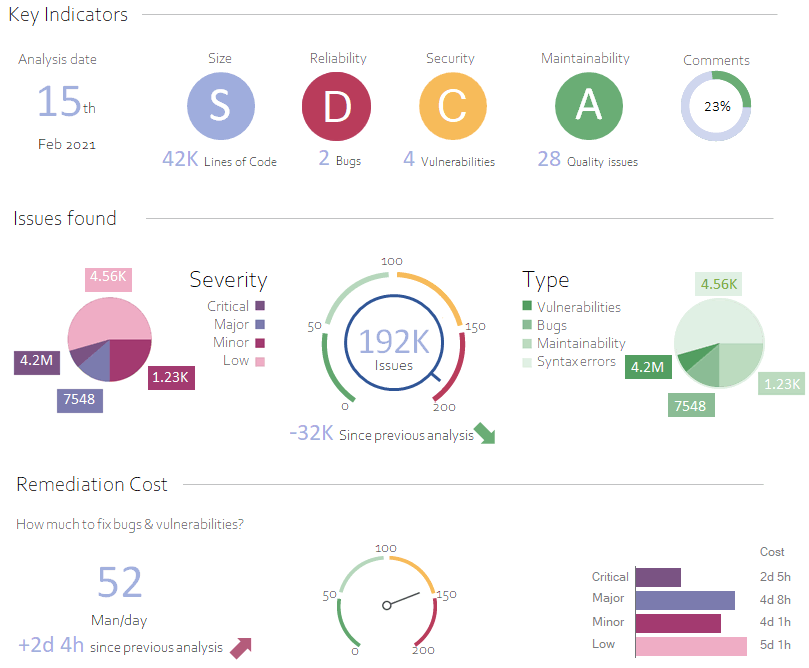
Code Inspection Summary
Overview of the problems found, with an estimate of the remediation costs.
From this page, you can drill down to the code and locate problematic instructions.
Locate issues in your code
Open the code related to a problem. Problematic instructions are highlighted. Explanations and compliant code examples help developers fix the problem.
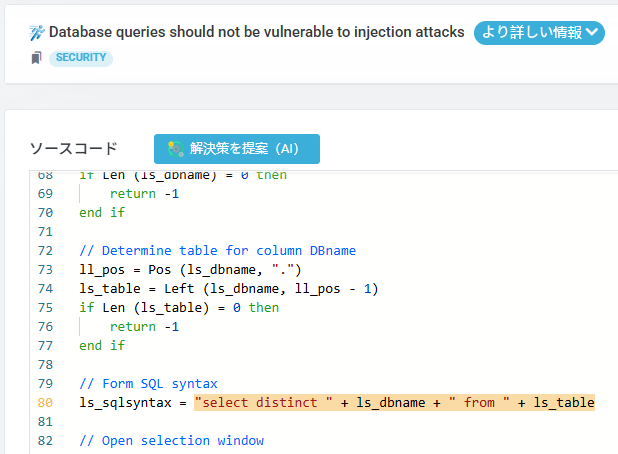
Identify and Fix Vulnerabilities
Detect security vulnerabilities like SQL injection, hardcoded credentials, and unsafe data handling. Each vulnerability includes severity level, remediation guidance, and secure code examples.
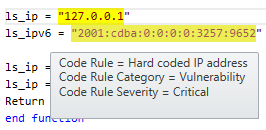
Implement CI/CD
Maintenance challenges
- Want to implement CI/CD (continuous integration / continuous delivery) for PB development and maintenance.
What is CI/CD ? Why implement it?
Continuous Integration (CI) consists of frequently merging all developers' working copies to a centralized version.
Continuous Delivery (CD) automatically verifies the security and reliability of a build before using it in production.
CI/CD increases the productivity of your development team, as well the quality and security of your application.
White Paper: Continuous Integration for PowerBuilder
Increase Agility, Productivity, and Security
Read the White PaperImpact Analysis
Analyze the impact of a change in your code
Maintenance challenges
- Want to know the impact scope when modifying code.
- Want to perform PB change work efficiently in a short timeframe.
- Want to find objects impacted by table/column changes.
Solutions
Estimate what you should modify to accomplish a change.
Don't break your application after a change!
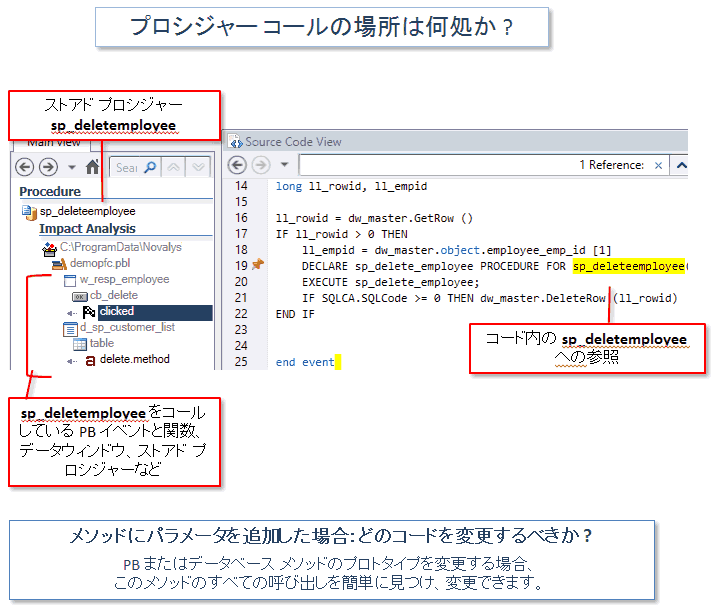
- If a table or column is changed, which code should I update?
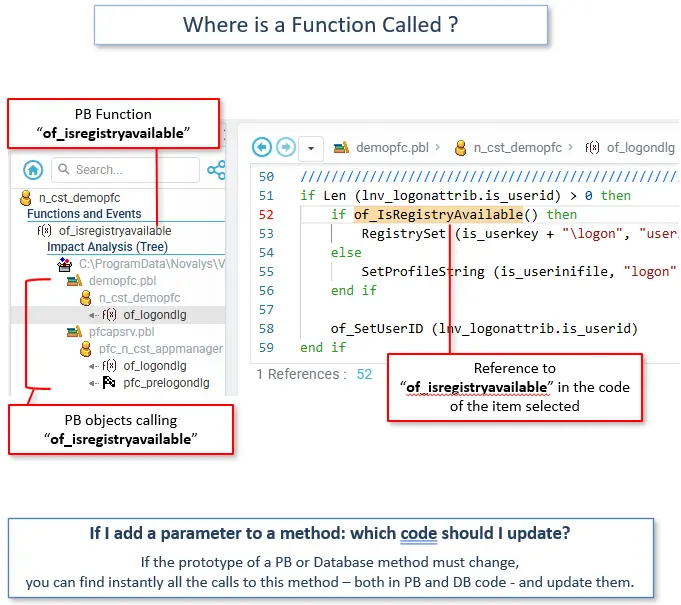
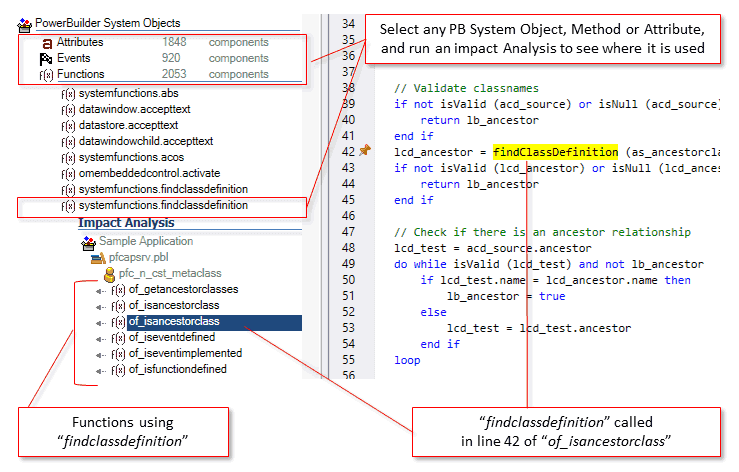
- If I add a parameter to a function, what else is affected?
- Where is a procedure called from PowerBuilder objects?
Code Performance
Find and fix performance problems.
Maintenance challenges
- Application response time is slow
- Specific screens take too long to load
- Don't know which queries are causing slowdowns
- Need to optimize database interactions
Solutions
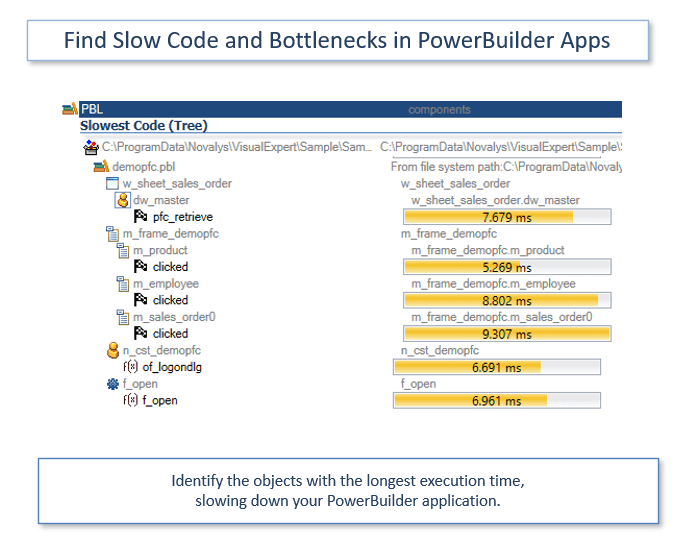
Slow Objects
Find the slowest objects in your application.
Use AI to suggest code optimization
Call graph performance analysis
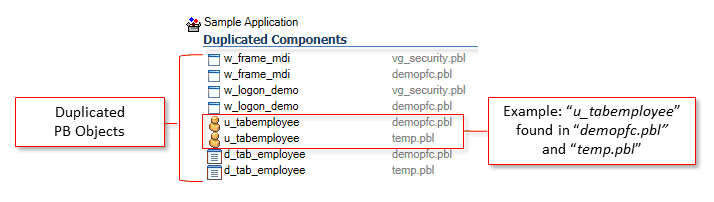
PowerBuilder does not support objects with the same type, name, and target.
You must find them to avoid unexpected problems
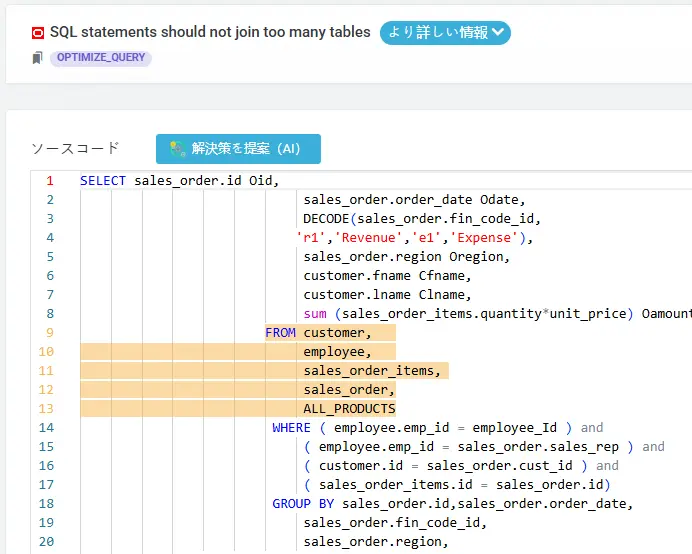
Slow SQL Queries
Find references to obsolete PB features in your PowerBuilder applications
Missing indexes
Identifying missing indexes that slow down SQL query execution.

Ready to Improve Your PowerBuilder Maintenance?
Contact NCS to discuss how Visual Expert can help you understand, document, and maintain your PowerBuilder applications more effectively.
Code Clean Up
Code inspection consists in examining the source code of your PowerBuilder application to find bugs, vulnerabilities, or design errors. This will improve the quality, maintainability, and security of your application.
Maintenance challenges
- Want to improve maintainability by cleaning up dead code (obsolete objects/methods/functions).
Solutions
Unused Objects, Methods, and Variables
Find the items for which no reference was found in the code.
read more
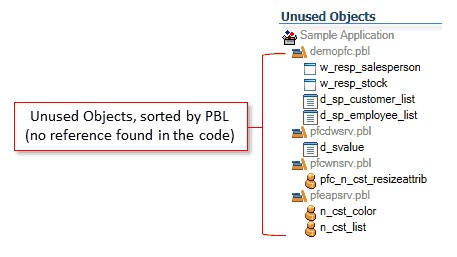 未使用オブジェクト、PBL順に並べ替え済み
(コード内で参照が見つかりません)
未使用オブジェクト、PBL順に並べ替え済み
(コード内で参照が見つかりません) Duplicate Objects
PowerBuilder does not support objects with the same type, name, and target.
You must find them to avoid unexpected problems
Deprecated Features
Find references to obsolete PB features in your PowerBuilder applications
Visual Expert Demo Site
Several solutions proposed on this page are provided by a tool called Visual Expert.
Vous pouvez le tester gratuitement en ligne, sur un exemple d'application.
To do this:
- Open this page in your browser.
- Use this guide to find out how it works.
Visual Expert Key Features
Code Analysis
Security Scan
Documentation
Performance